v1.0  ·  macOS 14+  ·  Apple Silicon & Intel

A screen marker for Mac
that actually works
during a Keynote slideshow.

Press one shortcut. Draw on any app. Add Spotlight and slide control with Ultra when you present live.

Download for Mac Free to try  ·  $5.99 Pro  ·  $14.99 Ultra  ·  No subscription
CursorBrush drawing on a Keynote slide during a live presentation

"Every other annotation tool forces Keynote out of fullscreen the second you start drawing. Useless during a live talk. So I built a marker that runs above the slideshow, never interrupts it, and toggles with a single key."

— Reason CursorBrush exists

01 / Drawing

Live ink on any pixel.

Pen, highlighter, eraser, arrow, shapes, text. Numbered markers for tutorials. Six-color palette plus opacity. No latency, no smoothing artifacts.

  • Pressure & tilt support via Sidecar Pencil Mode
  • Per-display overlay: current, all, or selected region
  • Snapshots capture annotated frames as PNG
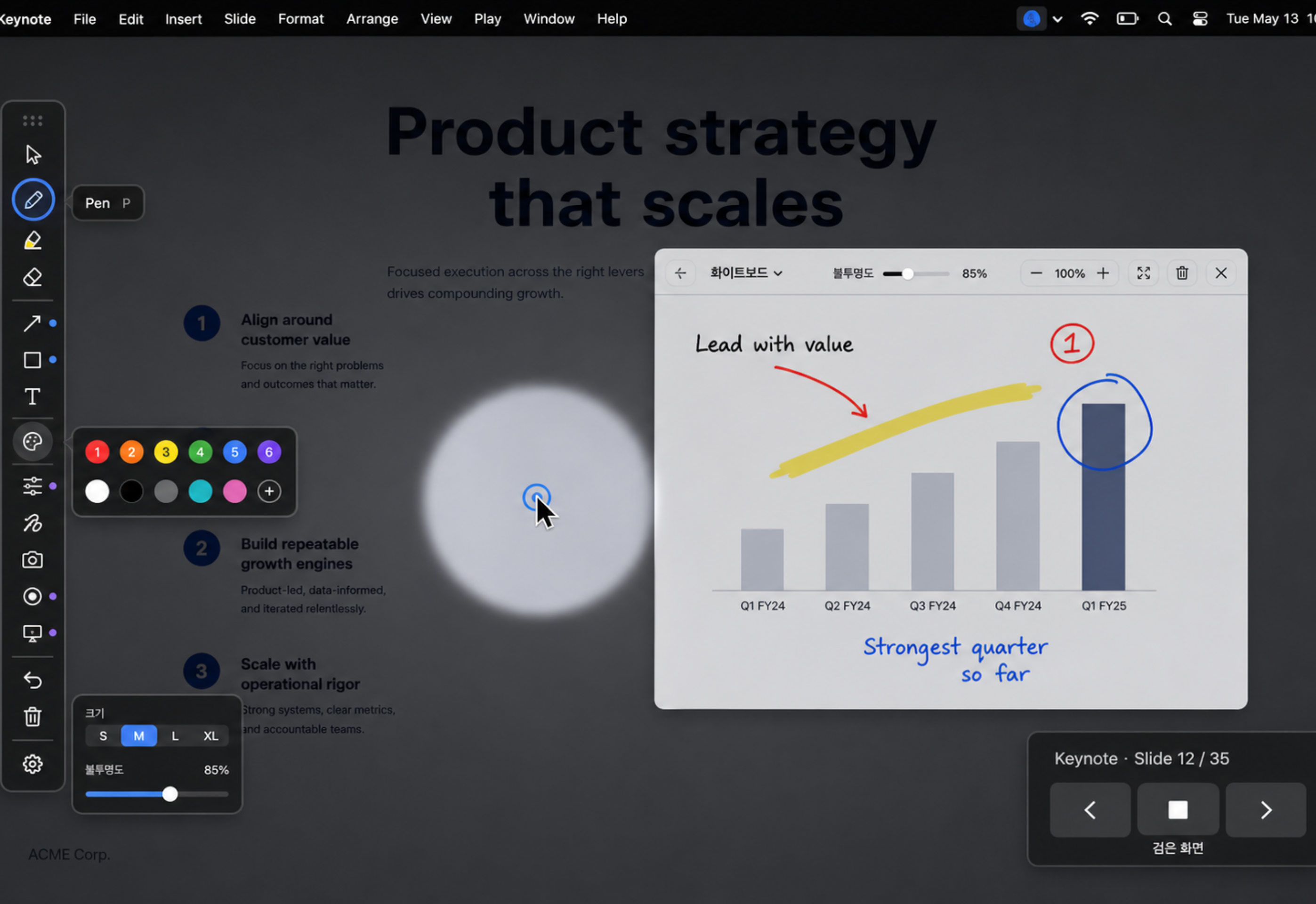
Drawing tools in action
Hint popup  1005
Toolbar  1004
Slide Controller  1003
Drawing Overlay  1002
Keynote Slideshow  1001

02 / Keynote

Drawing during a live
slideshow finally works.

A five-layer window stack sits above Keynote's fullscreen mode without breaking it. The slideshow stays exclusive. You stay on top.

  1. 1 Start your slideshow with ⌘P
  2. 2 CursorBrush auto-detects and arms
  3. 3 Tap to toggle draw / slide control
  4. 4 The slideshow never exits fullscreen

03 / Privacy

Zero data leaves your Mac.

No accounts. No telemetry. No tracking SDKs. Accessibility and Apple Events permissions are documented in plain English — and used only for what they say.

Pro is processed through StoreKit. We receive an anonymous transaction ID. We never see your Apple ID, email, or payment details.

Data collectedNone
TelemetryNone
Tracking SDKsNone
Network requestsNone
Apple EventsKeynote only
AccessibilityShortcuts only

Built in.

5 languages

English · 한국어 · 日本語 · 简体中文 · Türkçe

Custom shortcuts

Every key is rebindable. No Fn requirement.

IME independent

Works the same in any keyboard layout.

Multi-display

Current screen, all displays, or selected region.

Screen sharing

Drawings render in Zoom, Teams, Meet, QuickTime.

Single Apple ID

V1 purchases are tied to the Apple ID that buys them. Family Sharing is disabled.

Pricing

Pay once. Use forever.

No subscription. No recurring fees. Family Sharing is disabled for V1 IAPs.

Free $0
  • Pen · Highlighter · Eraser
  • 6-color palette
  • Undo / Redo / Clear
  • Single display
Download
Pro One-time $5.99
  • Shapes · text · numbered markers
  • Lasso selection
  • Whiteboard · snapshots
  • Freeze · PNG export
  • Multi-display annotation
Buy Pro
Ultra One-time $14.99
  • Spotlight mode
  • Presentation Mode slide control
  • Sidecar Pencil pressure + tilt
  • Pro-to-Ultra upgrade shown in app
Buy Ultra

Your next presentation
deserves better than a laser pointer.

Download on the Mac App Store

macOS 14 Sonoma or later  ·  Free to try  ·  Pro $5.99 / Ultra $14.99